
Never Miss a LinkedIn Lead Again
Be the first to connect. Instantly discover new LinkedIn opportunities and supercharge your sales outreach.
No registration required. 100% private. Free during beta.
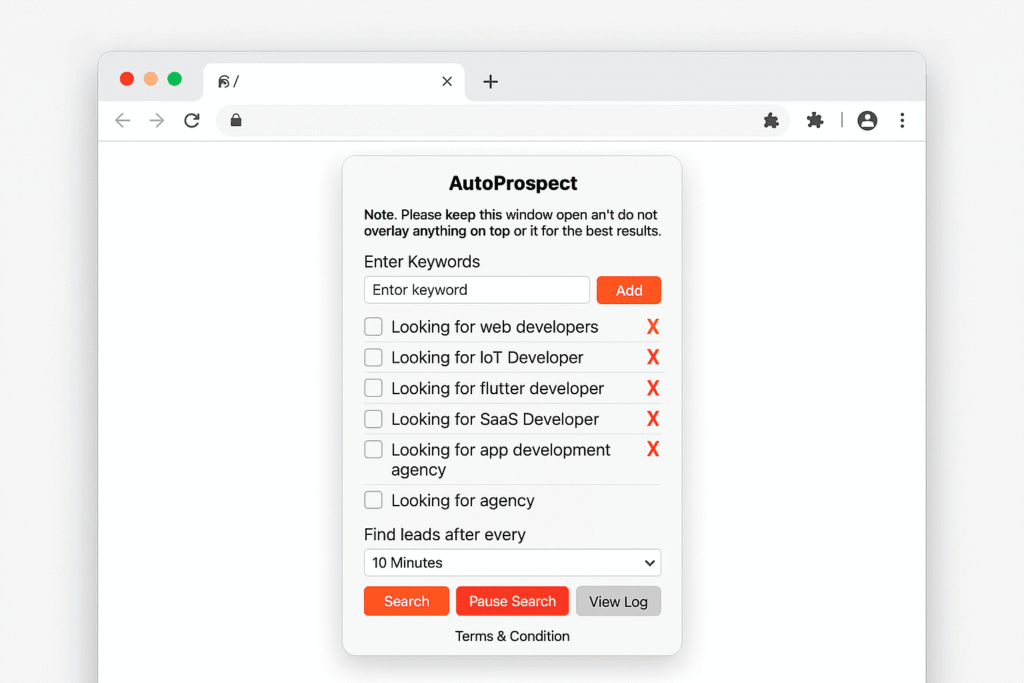
How AutoProspect Works
Step 1:
Enter your target keywords (e.g., “Looking to hire Node developer”).
Step 2:
Choose how often to check for new posts: 10, 15, 30, 45, or 60 minutes.
Step 3:
Get instant notifications the moment a relevant LinkedIn post appears.
Step 4:
Act first—connect, comment, or message before anyone else.
Why Sales Pros Love AutoProspect
Speed That Closes Deals
Be the very first to reply—don’t let competitors win leads while you’re still searching.
Effortless, Automated Prospecting
No more manual LinkedIn scrolling or wasted hours.
Total Privacy, No Registration
Your keywords and leads never leave your browser. No account, no spam, just results.
Set-and-Forget Simplicity
Get started in under a minute. Runs on autopilot. You only need a stable internet connection and an open LinkedIn tab.
Free Beta Access
Try every feature, unlimited, for free during beta. Help shape the future of LinkedIn sales prospecting.
Features
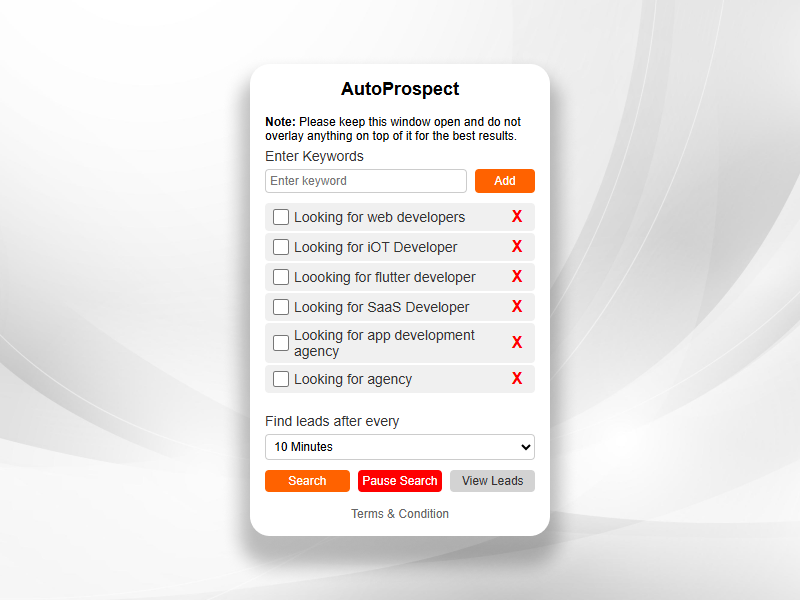
This is the “AutoProspect” extension interface—where you set up the keywords you want to track and manage your search preferences.
Features & Benefits:
Keyword Input:
Enter any keywords or phrases you want AutoProspect to monitor on LinkedIn (e.g., “Looking for web developers”, “Looking for SaaS Developer”).Smart List Management:
Add, select, or delete keywords easily. Each keyword becomes a lead magnet, helping you catch every opportunity.Flexible Timing:
Choose how often the extension checks LinkedIn for new matches—options range from every 10 minutes to every 60 minutes.Simple Controls:
Just one click to Search, Pause, or View Leads. Super intuitive and designed for busy professionals.Privacy-First:
No registration required. All data is kept local and private.Clear Guidance:
Helpful notes remind you to keep the window open and visible for best results—ensuring the tool runs smoothly.
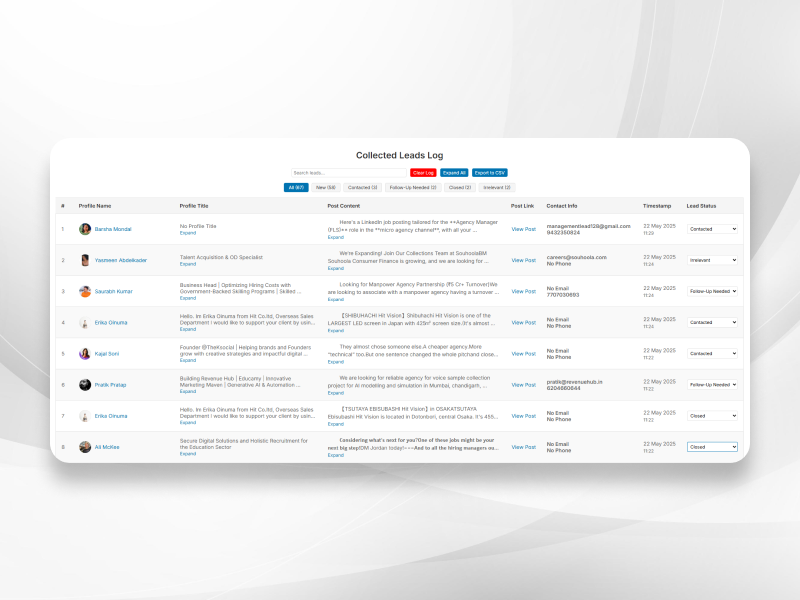
This is the “Collected Leads Log”—your command center for tracking every LinkedIn lead AutoProspect finds.
Features & Benefits:
Instant Overview:
See every potential lead at a glance, complete with name, profile picture, job title, post content, and contact details.Smart Filters:
Easily filter leads by status (New, Contacted, Follow-Up Needed, Closed, Irrelevant) with a single click—no more sifting through endless lists.Actionable Details:
Every row includes a “View Post” link to jump directly to the original LinkedIn post, plus a timestamp so you know exactly when the lead was found.Easy Updates:
Update the lead status with a dropdown—track your outreach in real time.Bulk Actions:
Search, expand all content, clear the log, or export to CSV for follow-up or reporting—everything is at your fingertips.Modern UI:
Clean, professional design with avatars and intuitive layout, making it easy to stay organized and productive.
FAQ
Q: Do I need to create an account or log in?
No. AutoProspect works right from your browser—no registration, no personal info required.
Q: Is my data safe and private?
Absolutely. All your keywords and lead data are stored locally on your device. We never access, collect, or share your info.
Q: How do I get started?
Just click “Install Chrome Extension” above, add your keywords, and let AutoProspect do the work.
Q: Does AutoProspect violate LinkedIn’s terms?
No scraping, no spam—AutoProspect simply automates what you can do manually, with a focus on respecting privacy and LinkedIn’s public post policies.
Q: Who is AutoProspect for?
Sales professionals, founders, recruiters, agencies—anyone who relies on LinkedIn for business opportunities.
Q: What if I need help?
Reach us anytime at skywinds.tech@gmail.com.
Contact Us
Got questions or feedback?
Email us at autoprospect@skywinds.tech
Or call us at +91 8733918542.